Table of Contents
Discover everything you need to know about the Real-Time Messaging Protocol or RTMP streaming protocol in this comprehensive guide. What is RTMP, how it works, how to choose and configure an RTMP server, troubleshooting common issues, and exploring emerging industry trends.
Despite being more than two decades old, RTMP remains one of the most reliable and widely used streaming protocols in 2026. Despite newer alternative protocols, RTMP continues to power millions of live video and audio streams worldwide, from platforms like Twitch to enterprise-grade live streaming workflows.
What many people may not realize is that Red5 was the first company to successfully reverse-engineer RTMP and make it broadly accessible to the industry. Today, major streaming services or platforms such as Ant Media and many others have built upon that foundation we pioneered.That gives us unparalleled insight into what makes RTMP servers truly effective.
What is RTMP?
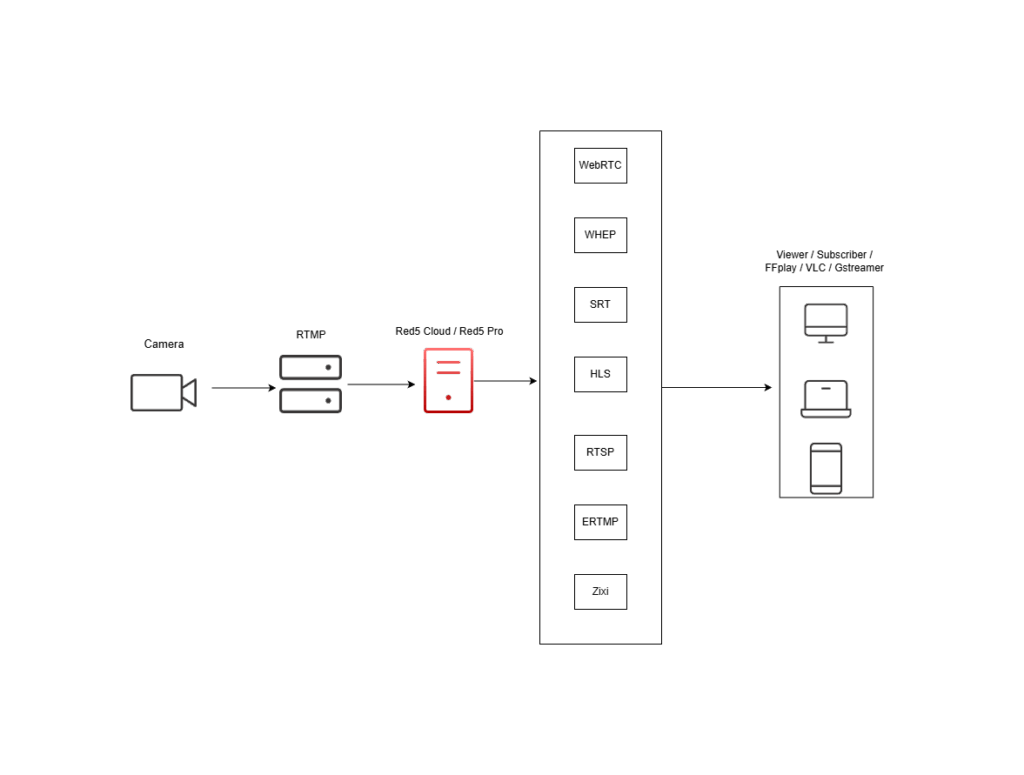
Real-Time Messaging Protocol (RTMP) is a streaming protocol originally developed by Macromedia (later acquired by Adobe) for transmitting audio, video, and data over the internet. Initially designed for Flash applications, RTMP has evolved far beyond its original scope to become a cornerstone of modern streaming infrastructure.
Real-Time Messaging Protocol operates on TCP port 1935 (this is configurable) and uses a chunk-based (fragments/segments) data transmission method that ensures reliable delivery of streaming video and audio content. This streaming protocol’s robust handshake process and error handling have made it a main-stay for professional broadcasting applications where stream reliability is paramount. While traditional RTMP has been serving the industry well, the landscape demanded improvements. Enter Enhanced Real-Time Messaging Protocol (ERTMP), a modernized version that addresses many of the original protocol’s limitations. ERTMP provides extended codec support and ABR options.
These capabilities keep RTMP relevant in today’s streaming ecosystem. Its low latency, reliability, security, and broad compatibility make it a trusted protocol for a wide range of live streaming use cases, including online meetings, webinars, sports broadcasts, and large scale live events. Content creators and broadcasters rely on RTMP every day to deliver live streams and engage audiences across streaming platforms (such as YouTube Live and Twitch) and social media networks (such as Facebook Live and LinkedIn Live).
How Does RTMP Streaming Work?

Real-Time Messaging Protocol is particularly important for live-streaming events and online streaming platforms because it enables reliable, low-latency transmission of audio, video, and metadata between an encoder and a streaming server. The protocol follows a series of well-defined steps to ensure efficient delivery. Let’s break down how RTMP works across its key stages:
- Stream Initiation: The process begins when the encoder (also known as the client) initiates a connection request to the RTMP server. Before any media data can be transmitted, the encoder and server must establish communication parameters and prepare the connection for streaming.
- Handshake Process: During the handshake, three packets are exchanged between the encoder and the RTMP server. These packets contain information such as the RTMP version and timestamps used to synchronize the connection. This brief exchange allows both sides to verify compatibility, confirm each other’s presence, and establish the trust required for reliable media transmission all within milliseconds.
- Connection Setup and Data Transmission: Once the handshake is complete, the client sends a connection request using Action Message Format (AMF) encoded messages. These messages include critical details such as the connection URL and the audio and video codecs that will be used.After the session is established, RTMP creates multiple logical channels for different types of data. You can think of these channels as lanes on a highway: one carries video, another carries audio, while others handle commands and metadata. This structure allows stream components to flow efficiently and simultaneously. Media data is then transmitted in small chunks in real time, helping maintain low latency and smooth delivery.
- Stream Distribution and Synchronization: The RTMP server receives, processes, and dynamically distributes the stream to viewers. Throughout the session, it continuously monitors connection quality, manages buffering, responds to network congestion, and ensures audio and video remain synchronized. If network conditions fluctuate, RTMP adjusts transmission behavior to maintain stream stability and minimize interruptions. In many ways, the server acts like a traffic controller; constantly managing the flow of data to keep playback smooth and reliable for viewers.
Key Components of RTMP Streaming
- RTMP server: The core infrastructure that receives, processes, and distributes streams. Red5 Pro provides enterprise-grade RTMP servers with sub-250 millisecond latency.
- Encoder: Software or hardware that captures and compresses audio/video for transmission. Popular options include OBS Studio, Wirecast, and FFmpeg.
- Player: The client-side application that receives and displays the stream content.
- CDN Integration: Content delivery networks such as CacheFly, Fastly, Cloudflare, Akamai work with RTMP servers to distribute streams globally with optimal performance.
Advantages and Disadvantages of RTMP

Real-Time Messaging Protocol has remained a cornerstone of live streaming for decades because of its reliability, low latency, and efficient real-time media delivery. Its adaptability and broad compatibility continue to make it a trusted choice for modern streaming workflows. Here are the key advantages that have contributed to RTMP’s long-standing success in the streaming industry.
Advantages of RTMP
- Universal compatibility: RTMP is widely supported across a broad range of devices and platforms. Whether you’re streaming from a computer, mobile device, or professional broadcast encoder, RTMP can handle the connection reliably. It is supported by major streaming platforms such as YouTube Live, Facebook Live, and Twitch, making it a versatile choice for broadcasters. Much like a universal adapter, RTMP seamlessly connects different streaming tools and platforms within a unified workflow.
- Low-latency delivery: In live streaming, every second of latency impacts the viewer experience. RTMP significantly reduces the delay between content upload and playback, enabling near real-time delivery. This makes it ideal for interactive live streams where broadcasters need to respond quickly to viewer comments, questions, and engagement.
- Reliability: RTMP is designed to maintain steady stream quality by automatically adapting to changing network conditions. If bandwidth drops or the connection becomes unstable during a live stream, RTMP manages flow control and buffering to minimize interruptions and keep content delivery smooth. It establishes a persistent connection between the broadcaster and the streaming server. This continuous connection is essential for ensuring stable, uninterrupted streaming, especially during long broadcasts such as live events, gaming sessions, or webinars.
- Low complexity: RTMP is known for its straightforward implementation, making it easy to configure, deploy, and troubleshoot across different streaming environments. Its mature architecture and well documented specifications simplify integration with encoders, servers, and streaming platforms. This low operational complexity allows broadcasters to achieve reliable performance with minimal setup time, making RTMP an efficient choice for both beginners and professional streaming workflows.
Disadvantages of RTMP
- Limited mobile optimization: RTMP is less efficient for mobile streaming compared to modern adaptive bitrate protocols such as HLS and MPEG-DASH. Most mobile devices do not natively support RTMP playback, requiring additional transcoding or protocol conversion before delivery. This adds complexity to streaming workflows and can increase infrastructure overhead. RTMP is also less adaptable to fluctuating mobile network conditions, making HTTP-based adaptive streaming protocols better suited for delivering smooth playback across varying bandwidth environments.
- Limited scalability: RTMP is not inherently optimized for large scale content distribution. As concurrent viewer counts grow, maintaining consistent performance often requires additional server capacity or protocol conversion through CDNs and edge delivery systems, which can increase operational complexity.
- Legacy Flash origins: RTMP was originally designed for Adobe Flash, and while it has evolved beyond that ecosystem, its architecture still reflects legacy design constraints. Since Flash playback is no longer supported by modern web browsers, RTMP can no longer be used directly for browser-based playback without being repackaged into modern delivery protocols such as H
- LS or MPEG-DASH.
- Higher server resource usage: Maintaining persistent RTMP connections requires significant server-side processing and memory resources. Compared to modern HTTP-based streaming protocols, this can result in higher infrastructure costs, especially when managing large numbers of simultaneous streams.
RTMP vs. Alternative Streaming Protocols
| Protocol | Latency | Reliability | Browser Support |
| RTMP | 250ms-3s | High | None |
| WHIP | <100ms | High | Native |
| SRT | 200ms-2s | Very High | None |
| WebRTC | <100ms | High | Native |
| RTSP | <100ms | High | None |
| HLS | 5-30s | Very High | Native |
| RTMPS | 250ms-3s | High | None |
Protocol Comparison Sheet: RTMP vs Other Protocols
RTMP vs RTSP
RTMP and RTSP are both low latency ingest protocols, but as a general rule, are used in very different use cases. RTMP is popular for live streaming to platforms like YouTube, while RTSP is a standard for IP cameras and drone streams. RTSP uses RTP (Real-Time Protocol) under the hood, making it more similar to WebRTC in transport. Another key difference is codec support: RTMP is limited to H.264, while RTSP supports multiple codecs, including H.265. RTSP is ideal for direct device-to-device workflows, while RTMP offers broader support for CDN and cloud streaming. You can compare H.264 and H.265 codecs side by side in our previous blog.
RTMP vs WebRTC
WHIP (WebRTC-HTTP Ingestion Protocol) represents the future of ultra-low latency streaming. Unlike RTMP’s TCP foundation, WHIP uses WebRTC for sub-second latency delivery. See our full comparison in WebRTC vs RTMP to learn the differences in latency, compatibility, and streaming quality. Major platforms such as Twitch and OBS Studio already support WHIP.
RTMP vs SRT
RTMP and SRT are both widely used ingest protocols for live streaming, but they are designed for different priorities. RTMP is known for its broad compatibility with streaming platforms, encoders, CDNs, and media servers, making it one of the most common choices for cloud-based live streaming workflows. SRT, on the other hand, was built for reliable, high-quality video transport across unpredictable networks.
One of the biggest differences is transport reliability. RTMP uses TCP, which can introduce buffering or increased latency on unstable connections. SRT uses UDP with built-in packet recovery and error correction, allowing it to maintain stream quality even over lossy or long-distance networks. This makes SRT especially popular for remote production, contribution feeds, and broadcasting live video from the field.
Codec support is another important distinction. RTMP is primarily associated with H.264 and AAC workflows, while SRT supports a wider range of codecs and transport formats, including H.265/HEVC. SRT is often used for professional contribution workflows between broadcasters, production teams, and cloud infrastructure, while RTMP remains a simpler and more universally supported option for streaming to online platforms and CDNs.
RTMP vs HLS
RTMP is primarily used for ingest, while HLS is strictly an egress (playback) protocol. You’ll rarely see HLS used for ingest, it’s designed for delivery only. HLS segments streams into chunks and uses playlists, which introduces high latency but enables massive scalability through CDNs. RTMP, by contrast, offers lower latency but isn’t supported by most CDNs anymore. It was once used for both ingest and playback in the Flash era, but that role has shifted to WebRTC for real-time delivery. Today, RTMP remains dominant for contribution, while HLS powers large-scale, on-demand playback.
RTMP vs RTMPS
RTMPS is simply the secure version of RTMP, using SSL/TLS to encrypt the stream. The “S” stands for “secure,” making it a variant of RTMP with added protection for sensitive data. Both perform the same in terms of latency and reliability. RTMPS is often required by platforms like Facebook Live to ensure secure transmission. Setting it up involves enabling HTTPS and using valid certificates. If your stream involves personal or confidential content, RTMPS is the better choice.
How to Set Up RTMP Streaming with Red5
Depending on your level of control and customization needs, you can live stream video and audio with RTMP streaming protocol with universal compatibility, low complexity, and latency starting at 250 ms by using one of the following methods:
Set Up a Free RTMP Server with Red5 Open-Source Media Server
Read this blog to learn how to set up a free RTMP server using our open-source media server. Here is why others choose it?
- It is forever free of charge. Our open-source media server has been freely available since 2005 and will remain that way.
- Regularly updated and maintained. Still actively developed and improved 20 years after its first release, Red5 continues to release new versions, keeping it reliable and up to date. Visit our Github page.
- Strong developer community. Join our Slack community to explore questions from other developers, connect with them, and learn from their experience.
While the open-source Red5 RTMP server provides strong foundational capabilities, it is best suited for developers, hobbyists, and students who want to experiment with live video streaming technology, build a media server, and learn how it works. If your use case is more complex and requires advanced features, consider trying one of our licensed products.
Launch a Fully Managed RTMP server with Red5 Cloud
Watch the Red5 Cloud product overview on YouTube.
If you want a fully managed, globally distributed streaming solution with an intuitive dashboard, Red5 Cloud is the easiest place to start. Sign up with no credit card required and get the free tier every month:
- 50 GB of streaming.
- 6,000 instance hours.
- Hosting in US Central.
- Access to documentation and email support.
Once you reach the 50 GB monthly limit, you can:
- Continue streaming immediately with our usage-based pricing model, Pay-As-You-Grow, at $0.08 per GB and $0.69 per instance hour. No monthly minimums and no fixed commitments.
- Or wait until the next monthly cycle for your free 50 GB to reset.
Read this documentation guide or watch the Youtube tutorial below to get started.
Self-Hosted RTMP server with Red5 Pro
If you need full customization, maximum flexibility, and complete control over your infrastructure, choose Red5 Pro, our server software built for ultra-low latency streaming at scale. Start with a 30-day trial and get access to all capabilities without limitations. Besides Red5 Pro also supports ERTMP bringing features like:
- Improved video codecs support including H.265.
- Better error handling and recovery mechanisms.
- Enhanced security features,
- Optimized for modern network conditions.
Read the following documentation guides to get started: Recording RTMP and ERTMP Ingest Streams and Publishing RTMP and ERTMP in an Autoscale Environment.
Choosing the Right Setup
Not sure which solution is the best fit for your streaming challenges? Visit our product comparison page or contact us to discuss your project.
Troubleshooting Common RTMP Issues

| Category | Issue | Solution |
| Connection Problems | Cannot connect to RTMP server | Verify server URL and port (usually 1935). Check firewall settings. Confirm stream key is correct. Test with a different encoder. |
| Frequent disconnections | Check network stability. Reduce bitrate settings. Enable auto-reconnect in OBS. Contact server administrator. | |
| Quality Issues | Poor video quality. | Increase bitrate (within bandwidth limits). Adjust encoder settings. Check source video quality. Optimize keyframe intervals. |
| Audio/video sync problems. | Adjust audio delay settings. Check system performance. Verify frame rate settings. Consider hardware encoding. | |
| Performance Problems | High CPU usage | Enable hardware encoding. Reduce video resolution. Lower frame rate. Close unnecessary applications. |
| Dropped frames | Reduce bitrate. Check network bandwidth. Optimize encoder settings. Upgrade hardware if needed. |
FAQs
What is RTMP latency?
RTMP latency varies based on configuration. With default settings, expect 2-3 seconds. Red5 Pro achieves sub-250ms latency through optimized configurations and real-time processing.
Is RTMP obsolete?
No, RTMP is not obsolete. It’s still widely used as the primary ingest protocol for major platforms like Twitch and YouTube Live. With Enhanced RTMP adding support for modern codecs and improved performance, the protocol continues to evolve and remains a reliable option for many live streaming workflows today.
Can RTMP work on mobile devices?
While RTMP can work on mobile, newer protocols like WebRTC are better optimized for mobile streaming. Red5 Pro supports both for maximum flexibility.
What’s the difference between RTMP and RTMPS?
RTMPS is RTMP over SSL/TLS, providing encrypted transmission. It’s essential for secure streaming applications.
How do I reduce RTMP latency?
Optimize buffer sizes, use hardware encoding, set keyframe intervals to 2 seconds, and choose a server optimized for low latency like Red5 Pro and Red5 Cloud.
What bitrate should I use for RTMP streaming?
For HD streaming, use 3000-6000 kbps. For 4K, consider 8000-12000 kbps. Always pick a bitrate within your bandwidth limitations.
Can I use RTMP for interactive streaming?
Yes, you can. While traditional RTMP is known for higher latency, Red5 Pro’s and Red5 Cloud’s optimized implementation reduces delay to under 250 milliseconds. This makes it suitable for interactive use cases like live auctions, virtual classrooms, and real-time gaming, where low latency is critical for maintaining a seamless two-way user experience.
What is the difference between stream key and RTMP?
RTMP is the protocol used to transmit your live video and audio from an encoder to a streaming server. A stream key is a unique identifier that tells the server where to send your specific stream. Think of RTMP as the delivery method and the stream key as the address that routes your broadcast correctly.
How to watch RTMP stream?
To watch an RTMP stream, you need a compatible media player or video streaming platform that supports RTMP playback. This typically requires a third-party player like VLC or integration into a video player with RTMP support. RTMP is not natively supported in modern browsers, so direct playback often involves using custom or embedded players.
What is a RTMP encoder?
An RTMP encoder is software or hardware that captures audio and video, compresses it, and sends it to an RTMP server using the RTMP protocol. Tools like OBS Studio let you configure audio and video settings, add stream keys, and go live. It’s essential for turning raw media into a streamable format.
Does RTMP support adaptive bitrate streaming?
Traditional RTMP uses single bitrate streaming, which means all viewers receive the same video quality regardless of their bandwidth. To support adaptive playback, you’ll need to set up multiple encoders or use a server-side transcoding solution. Red5 Pro can help implement strategies to improve stream accessibility even with single bitrate RTMP inputs

Product marketing manager with experience at software companies, startups, and enterprises in the live streaming industry since 2018. Her core expertise is SEO, but she also collaborates closely with the product development team to integrate marketing into Red5 solutions and drive adoption. She supports growth through go-to-market strategies, release announcements, email campaigns, case studies, sales enablement materials, social media, and other channels.