
What is WebRTC? You might’ve heard of this technology, and most definitely used it. WebRTC brings a whole host of ultra-low latency interactivity to browsers and mobile apps making the experience feel real-time. In this blog you will learn everything you need to know about this live streaming protocol: how it works, key features, who… Continue reading What is WebRTC? Definition, Use cases, How It Works [2025 Updated]
What is WebRTC? You might’ve heard of this technology, and most definitely used it. WebRTC brings a whole host of ultra-low latency interactivity to browsers and mobile apps making the experience feel real-time. In this blog you will learn everything you need to know about this live streaming protocol: how it works, key features, who should use it and why, and how it compares to other protocols.
Table of Contents
What is WebRTC?
WebRTC stands for Web Real-Time Communication and is a secure, bi-directional, real-time communication protocol that allows browsers, mobile apps, and devices to send and receive audio, video, and data with ultra-low latency. It supports both direct peer-to-peer (p2p) connections and server-assisted topologies such as SFUs, and is supported natively with standard browser APIs, making it suitable for real-time streaming, communications, and interactive applications. WebRTC streaming is still king in 2025, enabling sub-250 ms latency for true real-time scenarios.
This level of responsiveness is often described as streaming at the speed of thought because human perception cannot register machine level zero latency, making sub-250 ms effectively instant for users. Learn the most common WebRTC terms on this page.
You’ve almost certainly experienced WebRTC already while using popular online applications for video streaming or video calls. If you want to try it right now, you can visit our WebRTC demo and see real-time performance in action. What’s important today is synchronization of user experiences, you don’t want updates to arrive at different times particularly for live events.
Best of all, WebRTC has been designed to be easily added to your application using standard Javascript APIs and is an open source standard that is being developed by thousands of developers around the world. If you are interested in trying code examples, visit the official WebRTC GitHub repository and the Red5 Pro GitHub repository.
Key features
WebRTC includes several powerful features that transform the user experience into a real-time, interactive environment:
- Ultra-low Latency: WebRTC is designed for real-time communication so latency is measured in milliseconds rather than seconds making it ideal for developers to implement real-time streaming capabilities such as online gaming, real-time video and live events.
- Secure by Default: It forces secure data transfer using encryption from DTLS (Datagram Transport Layer Security) and DTLS to encrypt and decrypt at both ends which provides secure connection for video, audio and data. In some cases the security is sufficient enough without requiring expensive and complex digital rights management (DRM) for example real-time video.
- Scalability: Many assume WebRTC is hard or even impossible to scale, but this is possible with the right real-time streaming platform like Red5. Read this blog where we debunked the most common myths about WebRTC scalability. Red5 Pro scales WebRTC by combining the protocol’s two-way communication model with server software deployed in a hierarchical, three-tier architecture across public or private cloud environments. A core Origin Node ingests and distributes encoded content to Relay Nodes, which then serve multiple Edge Nodes that deliver live unicast streams at scale.
- Browser Native: WebRTC is supported natively in all modern browsers, including Chrome, Firefox, Safari, and Edge. This removes the need for plugins or external players and allows real-time communication to work directly from the browser.
- Echo cancellation and noise reduction: WebRTC includes echo cancellation and noise reduction, preventing the need to use additional libraries or pre-processing.
- Recording and VOD Capabilities: Live-to-VOD, DVR, and time-shifting are essential in real-time streaming workflows. While possible with WebRTC, Red5 delivers these features using HLS. When viewers pause, rewind, or scrub, they are outside the real-time window, making HLS better suited for recording and on-demand playback. Read more about the role of HLS within WebRTC in the real-time streaming world.
- Adaptive Bitrate (ABR): Unlike HTTP based streaming like HLS or DASH that require multiple bitrate renditions, WebRTC adjusts the bitrate, framerates and resolutions in real-time on the server based on network conditions.
- Protocol Interoperability: Operates alongside other streaming protocols including WHIP and WHEP, RTMP, RTSP, HLS, SRT, and Zixi. This allows WebRTC to integrate into existing workflows while supporting real-time and broadcast delivery from a single platform.
- Multi-track media support: WebRTC allows a single RTCPeerConnection to send and receive multiple audio and video tracks all of which can be processed independently. It means each peer can publish their own media tracks and also subscribe to multiple media tracks all of which can be processed separately. This enables advanced experiences such as spatial audio where individual sound sources can be positioned, prioritized, and mixed in real time.
- Multi-codec support: WebRTC supports multiple video codecs including VP8, VP9, H.264, and the next major codec AV1. The AV1 codec is expected to be the next generation codec for WebRTC given its compression efficiency which is 30% better than HEVC.
How WebRTC works
WebRTC enables real-time audio, video, and data transmission directly between browsers and applications. While the result feels immediate to users, the underlying process follows a clear and well-defined sequence of technical steps.
Below is a step-by-step explanation of how WebRTC streaming works, written for readers who are new to the technology.
1. Media capture on the device
When a user joins a WebRTC session, the browser or application requests access to local devices such as the camera, microphone, or screen. Once permission is granted, audio and video are captured locally as raw media data.
This capture happens entirely on the user’s device, without plugins or external software.
2. Real-time encoding
Raw media is too large to transmit efficiently. WebRTC compresses audio and video using real-time codecs optimized for ultra-low latency. Audio is typically encoded with Opus, while video commonly uses VP8, VP9, H.264, or H.265.
The encoded media is split into small packets so it can be transmitted continuously rather than in large chunks.
3. Signaling setup
Before any media can flow, both sides need to exchange connection information. This is done through signaling, which is handled by the application using HTTPS or WebSockets.
During signaling, peers exchange:
- session descriptions describing media capabilities
- supported codecs and encryption parameters
- network information needed to attempt a connection
Signaling is intentionally not defined by the WebRTC standard, allowing developers to integrate WebRTC into existing backends and protocols.
4. Network path discovery (ICE)
Most users are behind routers, firewalls, or NAT devices. WebRTC uses the ICE process to discover all possible network paths between peers.
ICE gathers candidates from multiple sources:
- direct local network addresses,
- public-facing addresses discovered via STUN,
- relay addresses provided by TURN servers.
Each candidate is tested, and WebRTC automatically selects the best available path.
5. NAT traversal with STUN and TURN
STUN allows a device to learn how it appears on the public internet, which often enables direct peer-to-peer connectivity. If a direct path cannot be established due to restrictive networks, TURN servers relay the media between peers.
An important practical detail for readers: a percentage of WebRTC sessions will always require TURN, especially in enterprise or mobile networks.
6. Secure connection establishment
Once a working network path is selected, WebRTC performs a cryptographic handshake using DTLS. This handshake verifies the connection and derives encryption keys.
All WebRTC media is encrypted in transit using secure RTP. Encryption is mandatory and cannot be disabled.
7. Media transmission over low-latency transport
Media packets are typically sent over UDP to minimize delay. WebRTC continuously monitors network conditions such as bandwidth, latency, and packet loss.
Based on these measurements, it dynamically adjusts bitrate, frame rate, or resolution to maintain smooth playback rather than pausing or buffering.
8. Handling packet loss and jitter
In real-time streaming, occasional packet loss is expected. WebRTC uses jitter buffers, selective retransmissions, and keyframe requests to recover quickly without introducing noticeable delay.
This design choice is critical for keeping conversations and live streams responsive under imperfect network conditions.
9. Decoding and playback
On the receiving side, packets are decrypted, reordered, decoded, and synchronized. Audio and video are played back with tight synchronization to preserve lip-sync and timing.
10. Scaling beyond two participants
For group calls or one-to-many streaming, WebRTC commonly introduces a media server. The most common approach is an SFU, which receives streams and forwards them without decoding.
This allows WebRTC to scale efficiently while maintaining low latency and adaptive quality for each participant.
11. Optional data, recording, and protocol bridging
WebRTC can transmit arbitrary data using data channels alongside audio and video. This is often used for chat messages, reactions, or real-time metadata.
Streams can also be recorded, relayed to other protocols, or converted to HLS or DASH for large-scale distribution. In these cases, server-side transcoding may be used to change codecs, bitrates, or resolutions to match playback or delivery requirements.
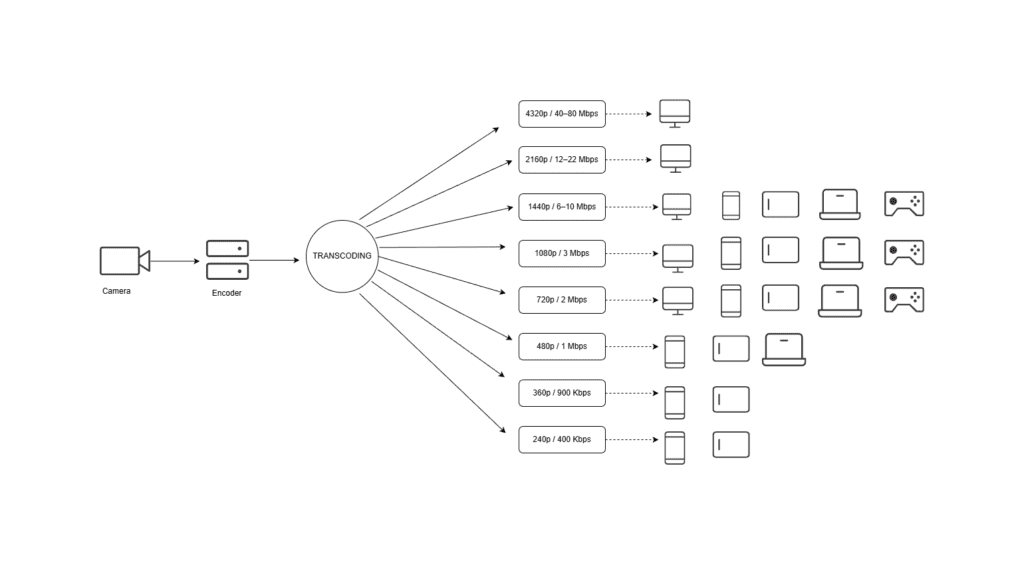
Diagram illustrating how the video transcoding process works.
WebRTC Use Cases

Examples of real-time use cases powered by Red5.
WebRTC streaming is crucial for a wide range of applications and industries. Here are just a few examples:
- Remote Production Workflows: Manage multiple contribution feeds on-premise and push them to the cloud for collaborative production.
- Live Sports Streaming: High latency breaks the experience. Fans expect real time at the venue or at home, and as watch parties and other interactive features grow, sub-second video becomes essential.
- Live Sports Betting: Bets must be placed and processed on current information. Even small delays cause missed opportunities or unfair advantages.
- GovTech: Sub-second streaming for traffic monitoring and smart cities, secure air-gapped video streaming and real-time drone feeds for public safety and defense.
- Surveillance and Security: Sub-second streaming enables real time monitoring and faster response to breaches or suspicious activity.
- News Broadcasting: Breaking updates need real time delivery so anchors, reporters, and viewers stay in sync and avoid talk-over.
- Online Auctions and Bidding: Sub-second latency keeps bids synchronized for all, increasing participation and final sale values.
- Online Casinos and Gambling: Live dealer and in-play wagers depend on real time video and data to maintain integrity and engagement.
- House of Worship Streaming: Broadcast religious services to remote congregations with secure, real-time video.
How WebRTC compares to other protocols
While WebRTC is often compared to other protocols, modern video streaming workflows often combine multiple protocols for ingestion, distribution and playback.
| Protocol | Latency | Reliability | Browser Support |
| WebRTC | <100ms | High | Native |
| WHIP | <100ms | High | Native |
| RTMP | 250ms-3s | High | None |
| SRT | 200ms-2s | Very High | None |
| RTSP | <100ms | High | None |
| HLS | 5-30s | Very High | Native |
| RTMPS | 250ms-3s | High | None |
Protocol Comparison Sheet: WebRTC vs Other Protocols
WebRTC vs RTSP
RTSP (Real-Time Streaming Protocol) is commonly used for IP camera surveillance systems. The stream is sent directly from the camera to the media server but cannot be played back in the browser.
WebRTC allows real time playback of the RTSP feed directly using a secure connection natively in the browser.
WebRTC vs RTMP
RTMP is widely supported for live stream ingestion with tools such as OBS. RTMP playback is limited in modern player environments so its primary use is live stream ingestion.
WebRTC however offers both ingestion and playback, however it can be used in combination with RTMP ingest to support lower latency playback as an alternative to HTTP based streaming such as HLS or DASH.
WebRTC vs HLS
HLS is one of the main video distribution protocols due to its wide support across CDN distribution and device compatibility. However, compared to WebRTC the trade off is higher latency at ~15 seconds.
WebRTC has its uses alongside HLS video distribution for real time interactivity such as live polls and real-time chat.
WebRTC vs WHIP and WHEP
WHIP (WebRTC-HTTP Ingestion Protocol) and WHEP (WebRTC-HTTP Egress Protocol) are the newest additions to the WebRTC ecosystem, designed to simplify how real-time connections are made. Rather than making several messages back and forth to each peer, WHIP and WHEP make it simpler by using HTTP requests to initiate the connection. This improves latency since there are fewer steps and makes it simpler to implement.
WebRTC vs MOQ
Media over QUIC (MOQ) is an emerging standard focused on improving HTTP based streaming using QUIC and HTTP/3. MOQ aims to upgrade large scale media distribution with lower latency that matches or even surpasses WebRTC ultra-low latency that’s CDN-friendly.
WebRTC already provides a mature real-time stack, whereas MOQ is still evolving and not yet widely deployed.
As new protocols like HESP and MOQ gain attention, WebRTC remains the foundation for real-time, interactive streaming experiences due to its support, and native browser adoption.
WebRTC vs HESP
HESP is a HTTP based protocol that aims to provide lower bandwidth and lower latency than other HTTP based streaming protocols such as HLS and DASH. Because it’s HTTP based, it can be scaled across a CDN, but it still falls short of WebRTC ultra-low latency of sub 200ms.
HESP is a suitable streaming distribution protocol for large audiences that don’t require real time interaction, whereas WebRTC provides ultra-low latency that’s required for real time streaming.
WebRTC vs CMAF
Common Media Application Format (CMAF) is not a protocol, it’s used to package HTTP based streaming protocols such as DASH and HLS for distribution. The goal of CMAF is to reduce latency and avoid having to use multiple protocols to support different devices. In other words, instead of having to store HLS and DASH formats, you can just use CMAF.
CMAF improves latency for HTTP based streaming, but WebRTC still leads the way for real time ultra-low latency.
What Can Red5 Help Satisfy Your WebRTC Streaming Requirements?
Red5 has been built to support large scale WebRTC streaming at sub-250ms latency powered by our XDN architecture. Read this blog to learn five other technical reasons why Red5 outshines other real-time streaming platform providers.

Depending on your level of control and customization needs, you can set up WebRTC streaming with either of Red5’s real-time streaming products.
1. Red5 Cloud
If you want a fully managed, globally distributed streaming solution with an intuitive dashboard, Red5 Cloud is the easiest place to start. Sign up with no credit card required and get the free tier every month:
- 50 GB of streaming.
- 6,000 instance hours.
- Hosting in US Central.
- Access to documentation and email support.
Once you reach the 50 GB monthly limit, you can:
- Continue streaming immediately with our usage-based pricing model, Pay-As-You-Grow, at $0.08 per GB and $0.69 per instance hour. No monthly minimums and no fixed commitments.
- Or wait until the next monthly cycle for your free 50 GB to reset.
Read this documentation guide and watch this Youtube tutorial to set up your WebRT streaming.
Watch a video tutorial on how to set up WebRTC streaming with Red5 Cloud.
2. Red5 Pro
If you need full customization, maximum flexibility, and complete control over your infrastructure, choose Red5 Pro, our server software built for ultra-low latency streaming at scale. Start with a 30-day trial and get access to all capabilities without limitations.
Choosing the Right Setup
Still not sure which solution is the best fit for your streaming challenges? Watch the Youtube video below, visit our product comparison page or contact us to discuss your project.
Conclusion
This post explains what WebRTC is, how it works and where it fits into the live streaming space. We compare WebRTC against other protocols and how it works in combination to build interactive real time solutions and how modern codecs are set to change the landscape to make real time live streaming implementation easier and more scalable.
Read our next blog to debunk the most popular myths about WebRTC
FAQs
Is WebRTC free or paid to use?
WebRTC is free and open source. There is no license or fees to use WebRTC protocol. However, to build reliable and scalable solutions often incurs costs to pay for the infrastructure.
What is a WebRTC leak?
A WebRTC leak is when a user’s real IP address has been exposed through the WebRTC API. It can happen during the signaling process. The issue is mitigated by using reliable, solid platforms such as Red5.
Is WebRTC safe to use?
WebRTC is secure by design using end-to-end encryption from SRTP and DTLS, making WebRTC safe and secure.
Does WebRTC require a browser?
While WebRTC is supported natively in all modern browsers, it can also be used in mobile apps, embedded devices and servers often using SDKs and APIs.
What is SDP in WebRTC?
SDP (Session Description Protocol) is the signaling format used by WebRTC during the offer/answer process. It provides the peers capabilities such as codecs, encryption parameters, network information so peers can negotiate how audio, video, and data will be sent.
What is a WebRTC gateway?
A WebRTC gateway ensures that a WebRTC application and a VoIP/SIP system can understand each other. It acts as the translator between the two systems.

Product marketing manager with experience at software companies, startups, and enterprises in the live streaming industry since 2018. Her core expertise is SEO, but she also collaborates closely with the product development team to integrate marketing into Red5 solutions and drive adoption. She supports growth through go-to-market strategies, release announcements, email campaigns, case studies, sales enablement materials, social media, and other channels.
