
Anyone working with video long enough eventually runs into the concept of transcoding and why it matters. In this blog you will learn what transcoding is, how it works and why transcoding is essential for modern video delivery to ensure a smooth playback on multiple devices and different network connection speeds. What is Transcoding? Transcoding… Continue reading What Is Transcoding? Essential Basics Every Developer Should Know
Anyone working with video long enough eventually runs into the concept of transcoding and why it matters. In this blog you will learn what transcoding is, how it works and why transcoding is essential for modern video delivery to ensure a smooth playback on multiple devices and different network connection speeds.
Table of Contents
What is Transcoding?
Transcoding is the process of converting a video from one format, resolution or bitrate to another. Because video is distributed across a wide range of devices over different network connection speeds, video transcoding enables better compatibility.
Raw video isn’t directly playable. It must first be encoded into a format devices can understand such as an MP4 using codecs such as H.264, H.265, VP8, VP9, or AV1.
So a 4K video can be converted into 1080p, 720p, and 480p versions. By producing multiple versions of the same video ensures viewers with different network connection speeds, old or new devices, and different screen sizes always get the best version they can play.
In 2025, transcoding matters more than ever where viewers jump between large 4K TVs, mobile devices, laptops, tablets, set‑top boxes, and media players and sometimes simultaneously. Transcoding plays the critical role of transforming one high-quality video into multiple versions optimized for each device.
Types of Video Transcoding
Lossy vs Lossless Transcoding
Lossless transcoding is when there is no data loss as a result of the transcoding process. In situations where you’d want to change the video container but not any underlying video data would result in no data loss because no compression has been performed.
Lossy transcoding is when the video is compressed, usually with the intention of reducing the file size while retaining as much quality as possible which results in data loss and quality degradation.
Lossy to lossless is not possible because the initial compression already resulted in data loss from the initial compression which cannot be recovered.
Parameter Change
Transcoding by parameter involves changing the video files bitrate (transrating), resolution (transsizing) or codec (format)
Bitrate Conversion
Bitrate conversion or transrating is the process of creating different versions of the same video that use more or less data per second. For example, changing an 8 Mbps video to 2 Mbps to support slower network speeds.
Resolution Conversion
Resolution conversion or transsizing is the process of changing the size of the video image. A 4K video has a resolution of 3840×2160 pixels which is too large for smaller devices such as mobile. To support mobile devices, transcoding can create versions of the same video with different resolutions e.g. 1080p, 720p, 480p.
Codec Conversion
A codec is the underlying technology used to compress video data (encoding) and decompress it during playback (decoding).
Since different devices do not always support the same formats, transcoding often involves changing the codec. This conversion is necessary to ensure the video is compatible with a wide range of playback devices or to leverage a newer compression method for greater efficiency and smaller file sizes.
Real-Time Transcoding
During a live stream, one high-quality live feed is being pushed to the live streaming platform, and needs to be immediately converted into multiple versions for adaptive bitrate streaming.
Unlike video on-demand platforms that have no time constraints to convert a single uploaded video into multiple renditions for Adaptive Bitrate Streaming (ABR), live streaming requires this process to be in constant motion.
The process requires the transcoder to intensely compress and package multiple renditions simultaneously while trying to maintain quality and avoid latency to the end viewer.
Examples of Transcoding
Video On-Demand Platforms
VOD platforms upload a near-lossless video (the master file) which is then transcoded into smaller, streamable multiple bitrates and resolutions versions to support viewers on any device. The most common transcoding format is HLS or DASH over HTTP.
Live Streaming Sports Events
Live streaming sports events require adaptive bitrate streaming, typically using a real-time transcoder to take the incoming live stream and create the multiple bitrate versions in real-time.
Video Content Distribution
Video production produces high quality master video files that are not compatible with general distribution, especially on the web. In this situation, you’d need to convert the file into a more friendly format that can be played back on web players. A typical format would be the H.264 that’s widely supported on the web.
How Transcoding Works
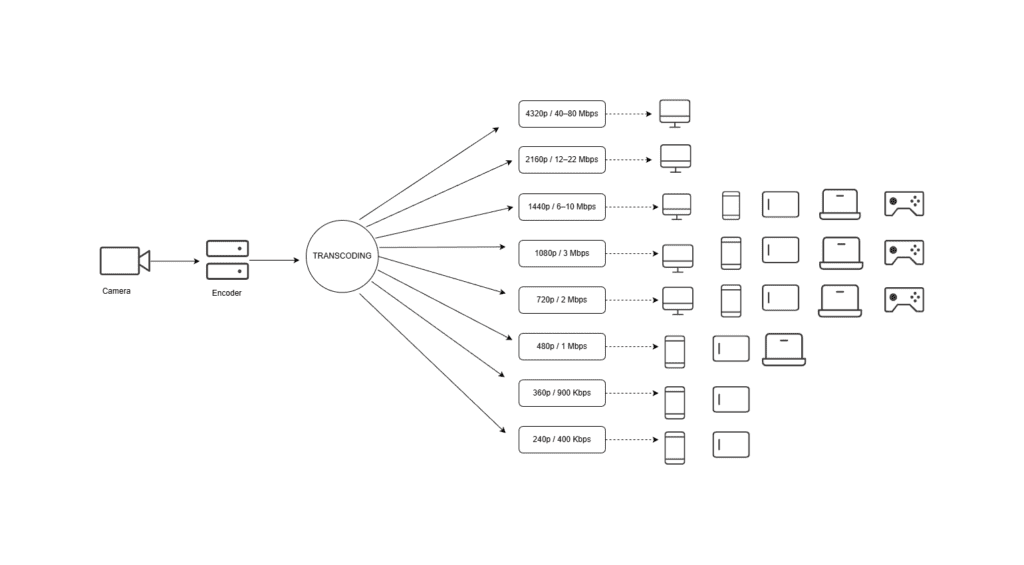
Diagram illustrating how the video transcoding process works.
Transcoding takes a video or audio file, decodes into its raw form and then can make any necessary changes to the video, such as changing the resolution (transsizing), the bitrate (transrating) or framerate of the video before encoding the video into its target format.
- Decoding: The transcoder uses the current video file’s codec (the decoder) to uncompress the file back into raw data.
- Processing: The transcoder makes the necessary changes (e.g., changing bitrate, resolution, applying filters) to the raw, uncompressed data.
- Encoding: The transcoder uses the target codec (the encoder) to re-compress the video into the target codec and container.
Transcoding uses a high amount of computational resources, such as the CPU, graphics and memory, which is why it’s recommended to use specialised servers to perform such a task.
You can learn more about this pipeline in the Red5 Pro Transcoder guide.
Transcoding vs Encoding vs Transmuxing
We already know that encoding is the process of compressing the raw video and audio using a codec and transcoding is the process of converting a video into a different format and applying parameter changes such as bitrates and resolution.
Transmuxing is the process of changing the container of the video without making changes to the raw video. For example, taking an MP4 and converting it into a WebM video. The codec hasn’t been changed, only the wrapper/container.
A good example is a camera sending an RTMP live stream to the server. The server then repackages the feed into HLS or DASH containers for widespread distribution to viewers.
Why Do We Need Transcoding?
Transcoding is essential for live streaming or video on-demand services where the end user is consuming the video across a wide range of devices and network bandwidths. Without transcoding, every user viewing the video would receive the same format that won’t be able to be played on all devices.
Benefits of Transcoding
- Compatibility: convert the video into any container and codec supported by the target device. It means the high quality master file can be converted and played on everything from the latest smart TV to an older mobile phone.
- Adaptive Bitrate (ABR): transcoding allows multiple versions of a video to become available to a player and switch to the most appropriate quality version for the viewer’s current internet speed
- Cost savings: transcoding enables the ability to compress videos and reduce demand on bandwidth resulting in reduced costs for delivering video.
How to Choose A Transcoder
Choosing the right transcoder ultimately comes down to computing resources and the time you have available. Transcoding is one of the most resource-intensive processes a computer system can perform which requires constant processing power.
Before choosing a transcoder, you need to evaluate several key factors:
Cloud Transcoding vs. Software Transcoding
Live streaming platforms typically use transcoders hosted on cloud infrastructure such as AWS or Google because of their scalability and almost unlimited resources. A live streaming service that intends to serve a large audience will likely need a large amount of computing resources and cloud infrastructure can support this with minimal management and maintenance.
However, it could be that security and control is at the heart of your video workflow in which case deploying transcoding software on a private network might be more appropriate.
High-resolution and Codec Limitations
With growing demand to offer 4K video to viewers, you can’t always assume that every transcoder supports these high definition formats. Many 4K streams want to use the H.265/HEVC codec to manage file size given its highly efficient compression capabilities, but many transcoders do not yet have support.
Real-time transcoding is already highly resource intensive, but attempting to transcode 4K video in real-time requires even more processing power.
You also want to consider the bandwidth required to deliver 4K video and end user adoption. To push 4K video and deliver this high definition format requires significantly more bandwidth than 1080p HD video which is why not all transcoders support 4K video.
Audio Transcoding vs Video Transcoding
We’ve discussed mainly video transcoding, but while audio and video share the same process, they differ in formats and parameters. It could be that you want to transcode the audio of a video in which case when selecting a transcoder it’s important it’s also compatible with audio-only transcoding.
How Can Red5 Support Your Transcoding Requirements?
Red5 offers transcoding in both Red5 Pro, our self hosted server solution, and Red5 Cloud, our fully managed and globally distributed cloud based streaming platform.
Red5’s transcoding solutions are designed to deliver a scalable streaming solution through Adaptive Bitrate (ABR) streaming with support for multiple streaming protocols including WebRTC, RTMP and SRT.
Both Red5 Pro and Red5 Cloud also offer a configurable adaptive bitrate ladder to any resolution, not fixed to the standard 1080p, 720p, 480p like some transcoders and can also strip b-frames as they aren’t supported in WebRTC.
Using Cauldron, our self hosted scalable real time transcoding solution, you can create multiple bitrate variants of a single video stream for playback on multiple devices and network bandwidths with support for WebRTC..
Red5’s streaming solutions allow for:
- Publishing multiple provisioned streams.
- Support for multiple streaming protocols including WebRTC
- Publishing a single stream that generates multiple bitrate variants.
- Subscribing to a stream via adaptive bitrate, which will allow dynamic upgrading and downgrading of the stream quality based on network conditions.
Red5 Pro supports auto-scaling to handle large demand for delivering high quality live streams.
Conclusion
This post helps you understand what transcoding is, how it works, and why it matters. We cover how a single high-quality video can be converted into multiple versions so it plays smoothly across different devices and network bandwidths. Transcoding is an essential part of modern video delivery, helping you achieve smoother playback, wider compatibility, and a more efficient streaming workflow.
FAQs
What is video transcoding?
Video transcoding is the process of creating new versions of a video in different sizes, qualities, or formats so it plays smoothly across all devices and network conditions.
Is transcoding good or bad?
Transcoding is essential. It improves compatibility, prevents buffering, and enables adaptive bitrate streaming.
What is an example of transcoding?
A common example is turning a 4K video into 1080p, 720p, and 480p versions for playback on different devices.
What is 4K transcoding?
4K transcoding converts ultra-high-definition 4K video into smaller renditions and formats, often requiring high powered CPU or GPU computers due to the large amount of data.
Try Red5 For Free
🔥 Looking for a fully managed, globally distributed streaming PaaS solution? Start using Red5 Cloud today! No credit card required. Free 50 GB of streaming each month.
Looking for a server software designed for ultra-low latency streaming at scale? Start Red5 Pro 30-day trial today!
Not sure what solution would solve your streaming challenges best? Watch a short Youtube video explaining the difference between the two solutions, or reach out to our team to discuss your case.

Product marketing manager with experience at software companies, startups, and enterprises in the live streaming industry since 2018. Her core expertise is SEO, but she also collaborates closely with the product development team to integrate marketing into Red5 solutions and drive adoption. She supports growth through go-to-market strategies, release announcements, email campaigns, case studies, sales enablement materials, social media, and other channels.
