
Understanding what is CMAF starts with recognizing its limitations as well as its strengths. CMAF improves efficiency and scalability for HTTP-based streaming, but it cannot match the real-time performance of technologies like WebRTC. This article explains where CMAF came from, how it works, how it compares to HLS, WebRTC, DASH, and fMP4, and how to… Continue reading What is CMAF Streaming and How It Compares to Others?
Understanding what is CMAF starts with recognizing its limitations as well as its strengths. CMAF improves efficiency and scalability for HTTP-based streaming, but it cannot match the real-time performance of technologies like WebRTC. This article explains where CMAF came from, how it works, how it compares to HLS, WebRTC, DASH, and fMP4, and how to decide whether CMAF is the right choice for your project.
Table of Contents
What is CMAF?
CMAF, or Common Media Application Format, is an open standard for packaging video, audio, and text for adaptive HTTP streaming. It defines a common media container that can be used across modern streaming workflows, helping simplify distribution while improving efficiency.
Rather than introducing a new delivery protocol, CMAF focuses on how media is encoded and segmented so it can be reused across different playback environments. This makes it easier to manage assets, reduce operational overhead, and support scalable streaming on a wide range of devices.
CMAF is widely adopted across the streaming industry and serves as a foundation for low-latency HTTP streaming when combined with compatible delivery modes and player support.
CMAF Origins: HTTP Live Streaming and HLS Redundancy
Originally, the HTTP based streaming protocols HLS and MPEG-DASH were (and continue to be) the most widely used methods to distribute live streaming media. Delivering an HTTP stream involves dividing the video into small chunks that reside on an HTTP server. In this way, the individual video chunks can be downloaded by a video player via TCP. This allows the video to traverse firewalls easily, where it can be delivered as it is watched, thus minimizing caching.
However, there is a drawback involving the encoding of audio and video data. HLS traditionally uses TS containers to hold the muxed a/v data, while DASH prefers the ISO-Base Media File Format holding demuxed tracks.
In order to connect with a variety of devices, content owners must package and store two sets of files, each holding exactly the same audio and video data. This creates an issue for Content Delivery Networks (CDNs) using their HTTP networks to deliver streaming content as it doubles storage costs and bottlenecks bandwidth throughput with redundant processing.
The creation of the CMAF came out of efforts to solve this redundancy problem. Created in 2017 by a joint effort between Microsoft and Apple, CMAF is a standardized container designed to hold video, audio, or text data that is deployed using HTTP based streaming protocols: HLS or MPEG-DASH.
Bitmovin provides the following definition:
CMAF defines the encoding and packaging of segmented media objects for delivery and decoding on end-user devices in adaptive multimedia presentations. In particular, this is (i) storage, (ii) identification, and (iii) delivery of encoded media objects with various constraints on encoding and packaging. That means CMAF defines not only the segment format but also codecs and most importantly media profiles (i.e., for AVC, HEVC, AAC).
The advantage of CMAF is that media segments can be referenced simultaneously by HLS playlists and DASH manifests. This allows CDNs to store only one set of files which in turn doubles the cache hit rate making the process more efficient.
How CMAF Works
CMAF defines how media is encoded, segmented, and packaged so it can be delivered and decoded consistently across adaptive streaming systems. Content is organized into CMAF Presentations, which contain time-aligned Switching Sets made up of one or more Tracks encoded at different bitrates, resolutions, or qualities. These aligned fragments allow players to switch between variants seamlessly during playback without disrupting audio or video continuity.
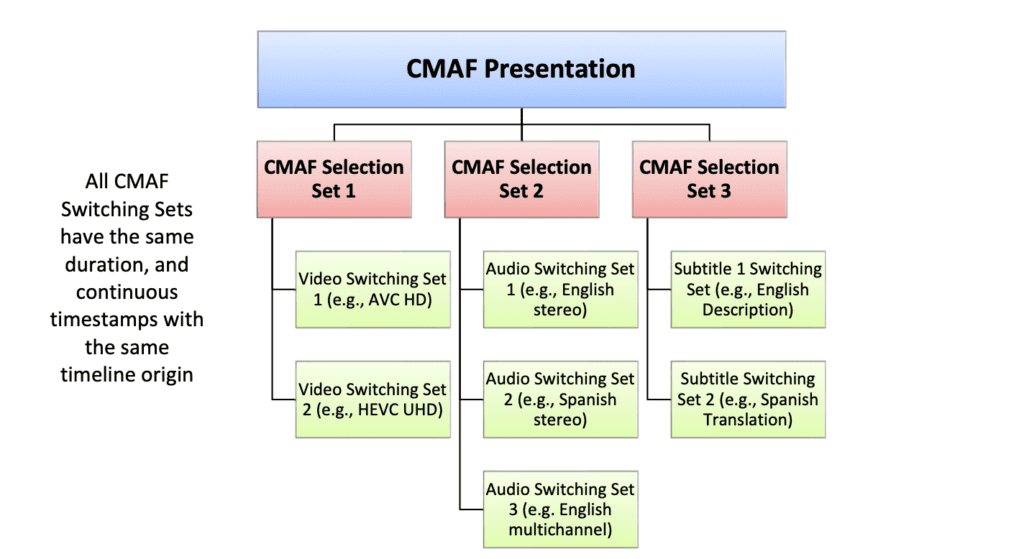
CMAF Presentation structure.
CMAF media is delivered as addressable objects such as Fragments, Segments, and Chunks, but CMAF itself does not mandate a specific manifest format or delivery protocol. This separation allows the same encoded media to be used with different playback systems while maintaining consistent decoding behavior.
For low-latency use cases, CMAF supports chunk-based delivery, where fragments are divided into smaller chunks that can be encoded, delivered, and decoded incrementally before a full segment is complete. This enables just-in-time playback while remaining compatible with standard HTTP delivery and CDN workflows.
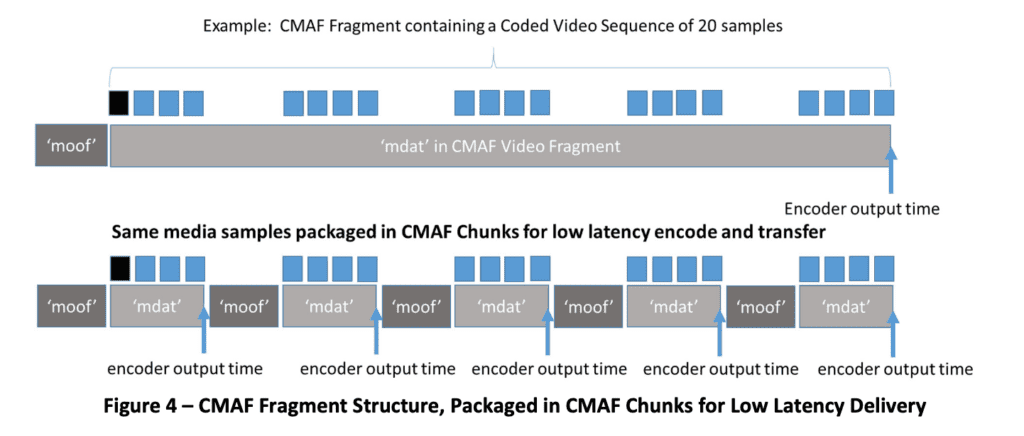
CMAF Fragment Structure, Packaged in CMAF Chunks for Low Latency Delivery. Source
How Does It Reduce Latency?
In actuality, CMAF containers are not able to reduce latency by themselves. Instead, a low latency mode (known as Low Latency CMAF, or Chunked CMAF) must be configured.
If you can’t tell by now, this is the really technical part so feel free to skip ahead if so inclined.
Chunked CMAF divides each container into smaller sections. Listing them from biggest to smallest: CMAF Container > Segment > Fragment > Chunk. Each chunk is defined as the smallest referenceable unit that contains at least a moof and mdat atom. One or more chunks are combined together to form a fragment which in turn can be merged into a segment.
In order to transmit each CMAF Segment, a POST request containing a CMAF Header is sent to the ingest origin server. Immediately after each CMAF Chunk completes encoding and packaging, it is sent through HTTP 1.1 chunked transfer encoding. This means that each segment can be progressively delivered as each chunk is ready rather than waiting for the entire segment to load before it can be sent out.
As an example, if the encoder is producing 4-second segments with 30 frames per second then it would make a POST request to the origin every 4 seconds and each of the 120 frames would be sent using chunked transfer encoding.
Then, the chunks ingested into the origin are delivered over HTTP chunked transfer encoding to a CDN where Edge servers make them available to the players which will eventually display the media. In order to retrieve the segment, the player uses the manifest or playlist associated with a stream to establish a connection with the correct Edge and then it makes a GET request.
What Are the Results?
Laboratory tests with CMAF have achieved end-to-end latencies as low as 600ms. However, results in the real world, away from the lab’s controlled environment, are less impressive. Current proof-of-concepts deployed over the open internet have shown a sustainable Quality of Experience (QoE) only when the end-to-end latency is around 3 seconds.
This increase is due in part to the fact that it requires many small chunks of 250 milliseconds. This would add to the number of HTTP calls happening (at least four per second), create higher bandwidth video, and increase server load; all of which add latency.
It should also be noted that CMAF creates problems for consistent stream quality, specifically in regards to adaptive bitrate, because of the way current algorithms estimate throughput.
Is a 3-Second Latency Good Enough for Real-Time?
Definitely not. While CMAF shows improved latency over vanilla HLS and DASH, it is still not low enough to enable fully interactive live video experiences.
As we’ve mentioned before, you can only have real-time streaming if the latency is under 500 milliseconds. In today’s world of instant communication and information, every second (and partial second) counts. Drone surveillance, social media chatting, live auctions, broadcasting live events among many other use-cases, all require real-time latency.
How CMAF Compares to HLS, WebRTC, DASH, and fMP4
CMAF vs HLS
The decision ultimately comes down to compatibility versus efficiency. Choose HLS if you need the broadest possible device support and highly reliable delivery across existing platforms. Choose CMAF if you want to standardize your media format, reduce duplicate encodes, and enable lower-latency HTTP streaming without abandoning HLS delivery. CMAF works alongside HLS, improving how media is packaged while HLS continues to handle distribution and playback.
CMAF vs WebRTC
In practice, the choice comes down to scale versus immediacy. CMAF excels at delivering the same high-quality stream to massive audiences efficiently. WebRTC excels at keeping participants synchronized in real time, enabling interaction that buffered streaming protocols cannot support.
If you want a deeper technical breakdown of latency, scalability, infrastructure requirements, and real-world use cases, read our CMAF vs WebRTC comparison blog.
CMAF vs DASH
The distinction here centers on packaging versus delivery. Choose MPEG-DASH if you need a flexible, standards-based streaming protocol with broad support across platforms and devices. Choose CMAF if you want a single, standardized media format that can be reused across DASH and other HTTP streaming workflows to reduce complexity and storage overhead. CMAF complements DASH by defining how media is packaged, while DASH focuses on how that media is described, delivered, and played back.
CMAF vs fMP4
The difference here lies between a file format and a complete packaging standard. Choose fragmented MP4 if you simply need a container format for segmented media. Choose CMAF if you need a standardized way to package fMP4 with defined constraints that enable interoperability, adaptive switching, and low-latency streaming. CMAF builds on fMP4 by adding rules and profiles that make fragmented media work consistently across streaming platforms and players.
Conclusion
When asked what is CMAF, the short answer is that it simplifies how streaming media is packaged and delivered at scale. It improves efficiency and latency compared to traditional HTTP streaming, but it is not intended for fully interactive real-time experiences.
Try Red5 For Free
🔥 Looking for a fully managed, globally distributed streaming PaaS solution? Start using Red5 Cloud today! No credit card required. Free 50 GB of streaming each month.
Looking for a server software designed for ultra-low latency streaming at scale? Start Red5 Pro 30-day trial today!
Not sure what solution would solve your streaming challenges best? Watch a short Youtube video explaining the difference between the two solutions, or reach out to our team to discuss your case.

Product marketing manager with experience at software companies, startups, and enterprises in the live streaming industry since 2018. Her core expertise is SEO, but she also collaborates closely with the product development team to integrate marketing into Red5 solutions and drive adoption. She supports growth through go-to-market strategies, release announcements, email campaigns, case studies, sales enablement materials, social media, and other channels.
