
Table of Contents
Are you trying to play an RTSP camera stream in a browser? You’re not alone. This is one of the most common challenges for developers working with IP cameras and surveillance systems. Unfortunately, there’s a hard truth: you cannot use RTSP protocol directly in web browsers. But don’t close this tab yet! While browsers don’t natively support RTSP, there are effective solutions to stream your IP camera feeds to any browser without delay. This is where protocol translation becomes extremely important. In many cases, the right answer is not replacing RTSP, but converting your RTSP stream into something browsers understand better, like WebRTC or soon MOQ.
If you want to skip the explanation and go straight to the implementation, click here.
Why Browsers Don’t Support RTSP Directly
The Real-Time Streaming Protocol (RTSP) has been the backbone of IP camera streaming, surveillance systems, industrial monitoring, drones, IoT devices, transportation systems, and enterprise video deployments all over the world for decades. It’s efficient and reliable. Companies have already invested heavily in hardware, networking, workflows, and operational tooling built around them. Replacing everything overnight is rarely practical, especially in industries where reliability matters more than chasing the latest trend. This is the classic if it ain’t broke, don’t fix it mentality. And honestly most of the time RTSP works perfectly for these use cases. However, if you’ve tried to connect your RTSP stream directly to a web browser, you’ve likely hit a roadblock.
Here’s why browsers can’t handle RTSP natively:
- Browser Architecture: Browsers are designed around HTTP/HTTPS protocols like HLS, not streaming-specific protocols like RTSP.
- Security Concerns: Browser vendors have strict security models that limit direct access to network protocols. RTSP would require low-level network access that browsers intentionally restrict.
- Plugin Deprecation: Historically, plugins like QuickTime or VLC browser extensions could handle RTSP, but modern browsers have phased out plugin support for security reasons.
- Network Considerations: RTSP commonly uses UDP for transport, which wasn’t supported in browsers until WebRTC came along (and even then, only in a controlled manner).
Common Workarounds And Why They Fall Short
When faced with the RTSP-browser challenge, many developers attempt these workarounds:
VLC Media Player Integration
Some try redirecting users to open streams in VLC. While this works technically, it creates a poor user experience because it requires installing external software, disrupts the web application flow, is not viable for commercial applications, and is impossible on mobile browsers.
HLS or DASH Conversion
Another approach is converting RTSP to HLS, but this introduces 5–30 seconds of latency, makes real-time monitoring impossible, and is unacceptable for security applications where immediate response is critical. As one of our customers in traffic management explained: “We tried HLS for our traffic camera system, but the 10-second delay meant operators were seeing accidents after they’d already happened. Real-time response was impossible.”
Understanding the Technical Challenge: RTSP vs. Browser-Compatible Streaming
To solve this problem effectively, we need to understand the technical differences between RTSP and what browsers can support.
Signaling Differences
RTSP uses a specific command structure for controlling media sessions:
- SETUP: Initializes the connection.
- PLAY/PAUSE: Controls media flow.
- TEARDOWN: Ends the session.
Browsers have no native mechanism to issue these commands. WebRTC, the browser-compatible real-time streaming technology, uses entirely different signaling systems based on JavaScript APIs, WebSockets, and protocols like ICE, STUN, and TURN.
Transport Layer Complexities
RTSP typically relies on RTP (Real-time Transport Protocol) for moving the actual video data. While WebRTC also uses a version of RTP (specifically SRTP for encrypted streams), the implementations aren’t directly compatible without a translation layer.
Codec Considerations
IP cameras typically encode video using H.264 and audio with AAC. While modern browsers support H.264 codec through WebRTC, older systems might require transcoding to VP8/VP9. Audio almost always needs conversion from AAC to Opus for WebRTC delivery. Learn more about codecs here.
Play RTSP Streams in Browsers By Converting RTSP to WebRTC
The most effective solution for displaying an RTSP stream in a browser is establishing a conversion layer between your RTSP sources and browser-friendly WebRTC:
Benefits
This approach delivers several critical benefits:
- Ultra-Low Latency: Maintains sub-250ms end-to-end delivery.
- Universal Compatibility: Works on all modern browsers without plugins.
- Scalability: Can handle thousands of concurrent streams.
- Security: Supports end-to-end encryption.
How It Works
The RTSP to WebRTC streaming proccess involves several steps:
- RTSP Client Connection: A server-side component connects to the IP camera as an RTSP client.
- Stream Ingestion: The raw RTP stream is ingested into the media server.
- Protocol Translation: The signaling mechanism is converted from RTSP to WebRTC protocol.
- Optional Transcoding: Video/audio is transcoded if necessary.
- WebRTC Delivery: The stream is delivered via WebRTC to browsers and web pages.
This server-side approach solves a fundamental architecture challenge: IP cameras act as RTSP servers, but to integrate with them, you need an RTSP client running on an intermediate server. As the old saying goes: “You can’t connect two wall outlets to each other—you need a plug.”
Red5’s RTSP to WebRTC Solution
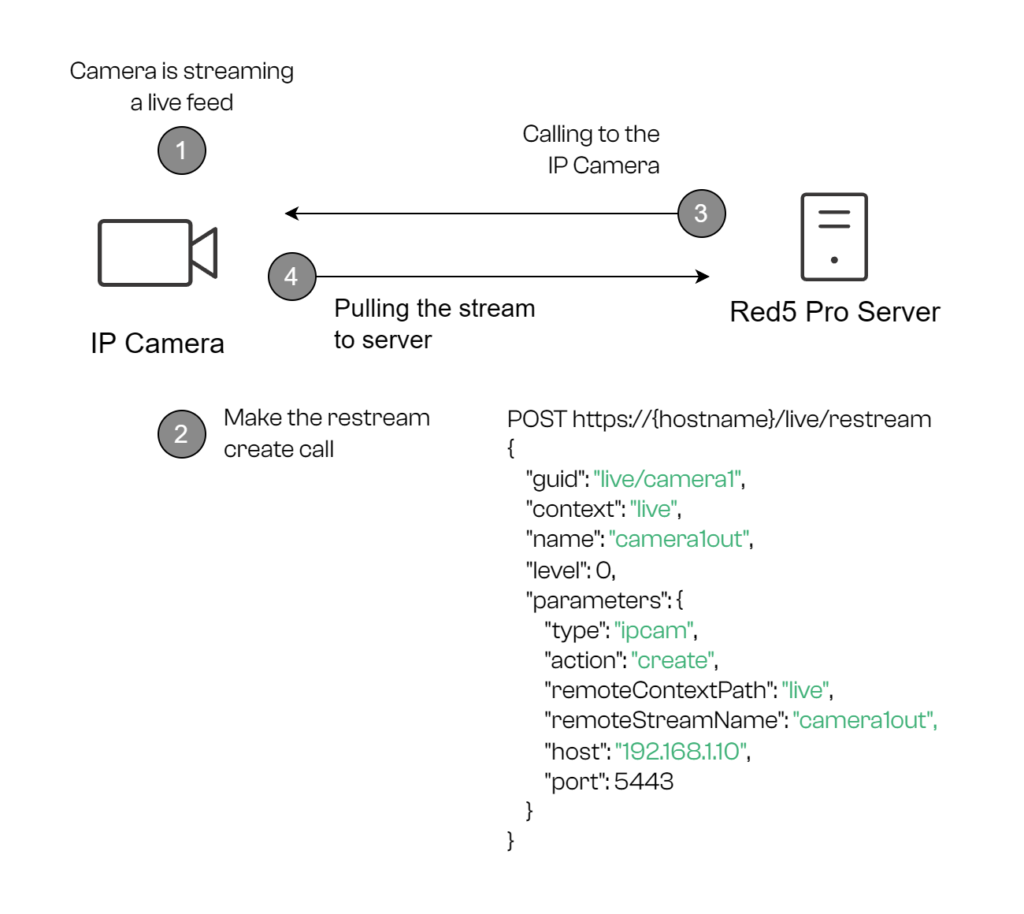
At Red5, we’ve built a comprehensive solution for this exact challenge called the Restreamer plugin. It works with our self-hosted video and audio streaming solution at scale Red5 Pro. This Restreamer plugin works by:
- Pulling the RTSP stream from your IP camera.
- Maintaining the native H.264 video codec when possible.
- Transcoding H.265 to H.264 when needed.
- Converting AAC audio to Opus for browser compatibility.
- Delivering the converted stream over WebRTC with minimal processing overhead.
How to Play an RTSP Stream in a Browser Step by Step
In order to archive this, you need to implement RTSP to WebRTC streaming. For this example, I’ll use the WebRTC HTTP egress protocol, WHEP.
- Identify your RTSP sources: Gather the RTSP URLs for your IP cameras, drones, IoT devices, transportation systems, and enterprise video deployments, etc. Red5 Pro’s Restreamer currently supports RTSP over TCP/IP. Supported video codec is H.264, while supported audio codecs include AAC, PCM ulaw, and PCM alaw.
- Set up Red5 Pro: Sign up for Red5 Pro (you can begin with a 30-day trial), then install it using one of the methods described in the documentation. Restreaming is enabled by default in Red5 Pro.
- Configure the Restreamer plugin: The Restreamer plugin integrates RTSP IP cameras and other streaming sources into Red5 Pro. Configuration options are located in the conf/restreamer-plugin.properties configuration file.
- Create the RTSP ingest stream through the Restreamer API: Red5 Pro uses pull mode for IP camera ingestion. In this mode, Red5 Pro connects to the RTSP source and rebroadcasts it as a local live stream.
- Publish the stream for browser playback: Once connected, Red5 Pro converts the RTSP stream into a browser-compatible stream. Most deployments use WebRTC playback for real-time latency streaming directly in the browser.
- Implement the player: Use a WebRTC-compatible player in your web application or reuse our WHEPClient built with Red5 HTML SDK.
// Example JavaScript for embedding a converted RTSP stream via Red5's WHEP implementation
import { WHEPClient } from 'red5pro-webrtc-sdk'

var rtcSubscriber = new WHEPClient()
var config = {
  protocol: 'ws',
  host: 'localhost',
  port: 5080,
  app: 'live',
  streamName: 'mystream',
  rtcConfiguration: {
    iceServers: [{ urls: 'stun:stun2.l.google.com:19302' }],
    iceCandidatePoolSize: 2,
    bundlePolicy: 'max-bundle',
  },
}

const start = async () => {
  try {
    rtcSubscriber.on('*', (event) => {
      const { type, data } = event
      console.log(type, data)
    })
    await rtcSubscriber.init(config)
    await rtcSubscriber.subscribe()
  } catch (e) {
    console.error(e)
  }
}
start()
5. Test your implementation: Monitor latency and adjust settings as needed. Before deploying to production, test your RTSP-to-browser streaming workflow under realistic load conditions to understand how many concurrent publishers and viewers your infrastructure can support. Feel free to use our open-source load testing bees.
6. (Optional) Scale your deployment: For larger deployments involving multiple IP cameras, drones, IoT devices, transportation systems, smart cities, industrial monitoring systems, sports venues, government infrastructure, or geographically distributed remote sites, you’ll need to configure clustering and autoscaling workflows for high availability and global distribution using the Clustering plugin. Clustering allows Red5 Pro Origin and Edge servers to repeat and distribute streams in real time across multiple nodes, enabling load balancing for both publishers and subscribers. Clustering is enabled by default for Startup, Growth Pro, and Enterprise licenses. It is not available for Trial users or Developer Pro license types.
When You Need More Than Basic Streaming
For advanced use cases, consider these additional capabilities such as metadata synchronization. Many security and industrial applications need metadata synchronized with video:
- GPS coordinates from mobile cameras.
- Object detection results.
- Sensor readings.
- Telemetry data.
Red5 Pro and Red5 Cloud support frame-accurate metadata delivery across the conversion process, ensuring your crucial data stays perfectly aligned with the video frames.
Many applications require viewing multiple camera feeds simultaneously. You have two options for accomplishing this:
1. Client-Side Approach
You can connect to multiple separate WebRTC streams and display them together in your browser application. This works well for a few streams but becomes resource-intensive as you add more cameras.
2. Server-Side Mixing
For more efficient delivery, especially with many cameras, server-side mixing is optimal. Red5’s Mixer node can combine multiple RTSP feeds into a single WebRTC stream. The process works like this:
- Each IP camera stream is ingested via RTSP.
- The Mixer combines them into a customized grid layout.
- This single composite stream is delivered via WebRTC.
- The browser only needs to process one connection, dramatically reducing resource usage.
A traffic management center using this approach reported: “We went from struggling with 4 camera feeds to smoothly displaying a 16-camera grid view with better performance. The difference was remarkable.”
Conclusion
While browsers cannot directly support RTSP protocol, converting to WebRTC is a good answer that provides a superior solution that offers live streaming with sub-250ms latency, universal browser compatibility without plugins, high-quality video delivery, security and scalability. The technical challenge of bridging RTSP to browsers is complex, but with the right conversion layer, you can achieve seamless integration that performs better than direct RTSP would have, even if browsers supported it.
Soon, you will also be able to convert your RTSP stream into MOQ (Media over QUIC), a next-generation streaming protocol that combines the real-time latency benefits of WebRTC with the scalability of HLS delivered through CDNs. It offers a simplified architecture that bypasses the limitations of older HTTP-based delivery methods.
Try Red5 For Free
🔥 Looking for a fully managed, globally distributed streaming PaaS solution? Start using Red5 Cloud today! No credit card required. Free 50 GB of streaming each month.
Looking for a server software designed for ultra-low latency streaming at scale? Start Red5 Pro 30-day trial today!
Not sure what solution would solve your streaming challenges best? Watch a short Youtube video explaining the difference between the two solutions, or reach out to our team to discuss your case.
FAQs
Can any IP camera work with this conversion process?
Any IP camera that outputs standard RTSP with H.264/H.265 video should be compatible. Some very old or proprietary cameras might require additional configuration.
What latency can I expect after conversion?
With Red5 Pro’s implementation, end-to-end latency typically ranges from 100-250ms, depending on network conditions and geographic distance.
Is the conversion process secure?
Yes, the entire pipeline can be secured with TLS for signaling and SRTP for media, providing end-to-end encryption.
How does this approach compare to WebSockets with JPEG frames?
Some developers attempt to stream MJPEG over WebSockets, but this approach consumes significantly more bandwidth and provides lower quality than proper RTSP to WebRTC conversion.
Can this work on mobile browsers?
Yes, WebRTC is supported on all modern mobile browsers, making this solution ideal for both desktop and mobile viewing.

The Red5 Team brings together software, DevOps, and quality assurance engineers, project managers, support experts, sales managers, and marketers with deep experience in live video, audio, and data streaming. Since 2005, the team has built solutions used by startups, global enterprises, and developers worldwide to power interactive real-time experiences. Beyond core streaming technology, the Red5 Team shares insights on industry trends, best practices, and product updates to help organizations innovate and scale with confidence.